Linear vs Tactile vs Clicky Keyboard Switches
A documentation-based guide to linear, tactile and clicky keyboard switches: what each type is, what Cherry, Razer and Logitech say about them, which numbers matter and a checklist to run before you buy.
Contents
The short answer
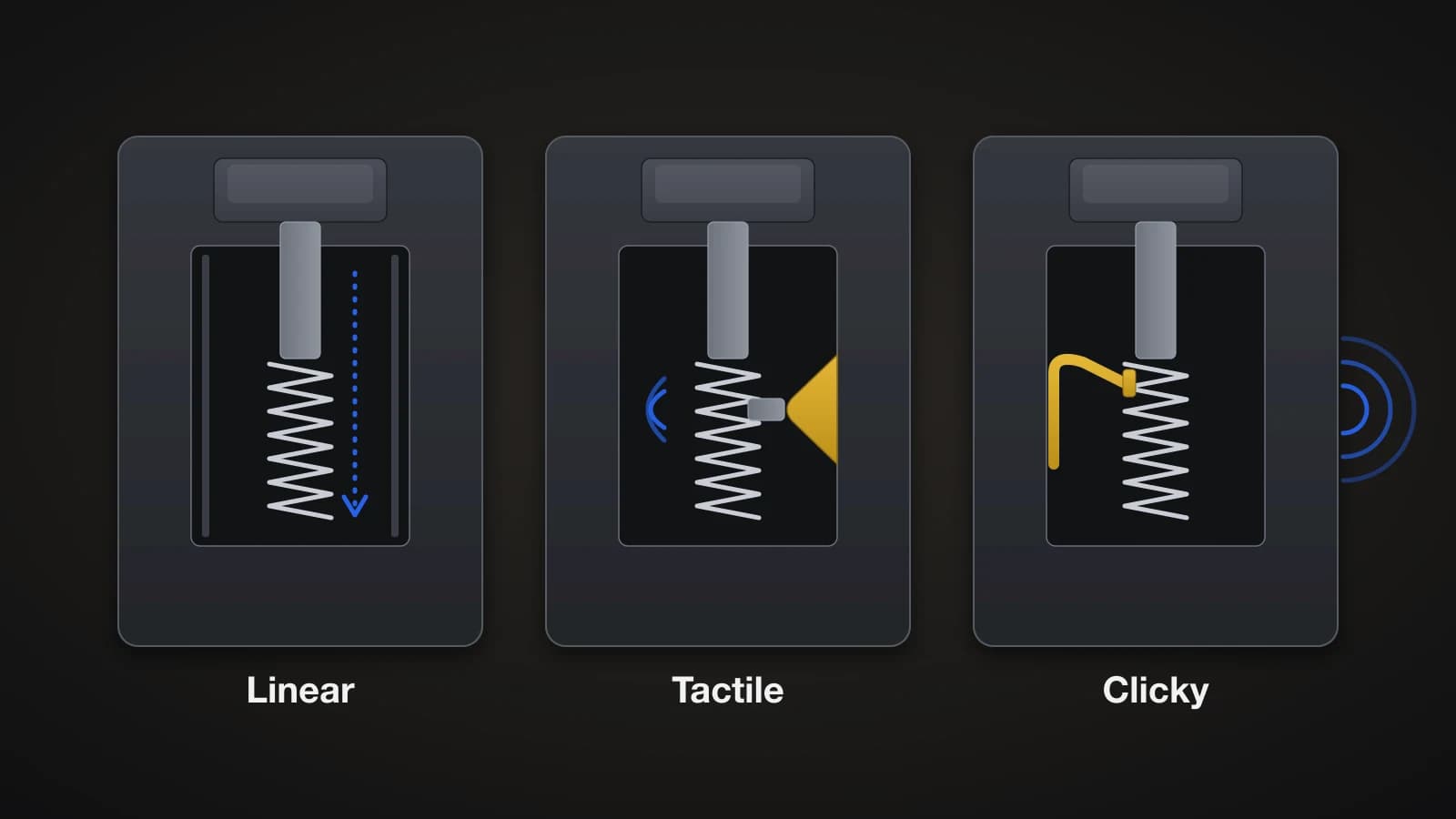
Linear, tactile and clicky describe the feel and sound of a keypress. A linear switch moves straight down with no bump. A tactile switch has a bump you can feel at the point where the key registers. A clicky switch has that bump plus an audible click. Cherry defines tactile as having "a noticeable and/or audible click point" and says linear switches lack that feedback, which means its definition puts clicky inside the tactile group.
If you want the most neutral press, start with linear. If you want to feel the moment the key registers without much extra noise, start with tactile. If you want sound as well as feel, and nobody nearby will mind it, look at clicky. That is editorial advice, because the maker pages describe each type but cannot say which one suits you.
How this guide works
Three keyboards from our catalog anchor the examples: the Razer BlackWidow V4 X, the Razer Huntsman Mini and the Logitech G915 X. Every technical statement comes from Cherry, Razer or Logitech. We have not handled any of these keyboards, so we compare documentation and not performance. Where a point is our own reading, the text says so.
What the three words mean
Cherry's overview of its MX switches is the cleanest reference for the vocabulary, even though it dates from 2017 and describes only Cherry's own design. It names four common MX colors: Red and Black are linear, Brown is tactile without the classic "click", and Blue is tactile with an audible click. Cherry does not treat clicky as a separate category, so on its page the audible click is a feature of one tactile switch.
Other makers use the words as style labels: Razer sells clicky and linear switches, and Logitech's G915 X page offers a Style choice of Linear, Clicky and Tactile. When a listing uses one, the maker's description of that exact switch is what matters.
Linear switches: one smooth press
Cherry describes its MX Red as a linear switch that "can be triggered quite fast and with minimal actuation force", with a figure of 45 centinewton (it notes that centinewton and grams are interchangeable here) and actuation after two millimeters. Cherry says that makes it suitable for gamers who play fast games, which is the maker's claim and not a measured result.
Cherry's MX Black is also linear, but with a heavier spring: about 60 centinewtons and two millimeters of pre-travel. That is a reminder that linear describes the shape of the press, not how light or heavy it is.
Razer's linear options use two designs. Its linear optical switch is listed with a 1.2 mm actuation point, 45 g of actuation force and a key feel of "Light and Instant". The Razer Yellow mechanical switch on the BlackWidow V4 X is described as "smooth and quiet as you actuate". Our catalog record for the Razer BlackWidow V4 X covers the linear version, and the Razer Huntsman Mini record covers the linear optical version. Razer sells both boards in a clicky style as well.
Logitech's G915 X page says its low-profile GL mechanical switches have a 1.3 mm actuation point. The page lists linear among three styles but does not describe any of them in more detail. Our Logitech G915 X record covers the linear version. If low-profile switches interest you, our low-profile guide covers what the term does and does not tell you.
Tactile switches: a bump you can feel
Cherry's MX Brown is its example of a tactile switch without the loud click. The page says it has "a tactile and thus detectable actuation point, but without the classic click", takes 55 centinewton of actuation force and has two millimeters of pre-travel to the actuation point. Cherry credits its quiet operation and noticeable actuation for why office users usually prefer it, and calls it a good alternative for gamers who also type a lot.
The Logitech G915 X page lists Tactile as a style but gives no description of how it feels, no force figure and no difference from the other two styles. Without that, we cannot say how Logitech's tactile version compares with Cherry's, and our shopping link below goes to the catalog's linear listing.
A caution on the word quiet: Cherry and Razer both use it, but neither page gives a sound measurement. If a quiet keyboard is your main goal, our quiet keyboard guide explains what the documentation does and does not say.
Clicky switches: a bump and a sound
Cherry's MX Blue is the page's example of the clicky end of the range. Cherry says it gives "precise feedback with an audible click and noticeable, relatively high actuation force", with 60 centinewtons needed and actuation after 2.2 millimeters. Cherry adds that these 'noisy' characteristics make the MX Blue not an optimal solution for open space offices, which is a maker statement worth weighing if you share a room.
Razer has two clicky designs. The Razer Green mechanical switch on the BlackWidow V4 X comes with "an audible click and tactile bump when pressed down", in Razer's words. The clicky optical switch is listed with a 1.5 mm actuation point, 45 g of force and a key feel of "Light and Clicky", and Razer calls it the only clicky switch with a 1.5 mm actuation point. Razer also publishes a comparison figure for the clicky optical switch without showing a method, so we do not repeat it as fact.
The numbers you will see: force, actuation point and travel
Actuation force is how hard you press for the key to register. Cherry gives it in centinewtons and notes that these equal grams; Razer lists grams. Actuation point is how far down the key has moved when it registers, which Cherry calls pre-travel. Lower numbers mean a key that registers sooner or with less force, not a better keyboard.
Be careful about comparing across makers. Cherry's MX Red is 45 cN with 2 mm to the actuation point. Razer's linear optical switch is 45 g with 1.2 mm, and Logitech's GL switches are listed at 1.3 mm. None of these pages describes a shared test method, so a figure from one maker is not a clean comparison with another. We think the safer approach is to compare within a maker's own range, as with Cherry's Red, Brown and Blue, and to treat the rest as context.
A short comparison from the documentation
| Point | Linear | Tactile | Clicky |
|---|---|---|---|
| Feel, per Cherry | No bump (lacks click-point feedback) | Noticeable and/or audible click point | Tactile with an audible click |
| Cherry example | MX Red, 45 cN, actuation after 2 mm | MX Brown, 55 cN, 2 mm pre-travel | MX Blue, 60 cN, 2.2 mm |
| Razer example | Yellow mechanical; linear optical at 1.2 mm | No separate tactile switch on the pages we read | Green mechanical; clicky optical at 1.5 mm |
| Logitech G915 X | Listed as a style | Listed as a style | Listed as a style |
| What makers say about sound | Razer: Yellow is "smooth and quiet" | Cherry: Brown has quiet operation | Cherry and Razer: audible click |
Feel is not the same as technology
Optical, Hall effect and mechanical describe how a switch senses a keypress. Linear, tactile and clicky describe how it feels and sounds. The two sets of words cross over. Razer's optical switch comes in clicky and linear versions, and its mechanical switch in clicky and linear versions as well. Our Hall effect, optical and mechanical guide explains the sensing side, so you can read a listing for both.
Which type fits which buyer
Linear fits a buyer who wants an uninterrupted press and does not need feedback at the actuation point.
Tactile fits a buyer who wants to feel where the key registers without adding a loud click. Cherry describes the MX Brown as having a noticeable actuation point and quiet operation, though the page gives no sound figure.
Clicky fits a buyer who wants an audible confirmation and does not share a quiet space; if others hear your keyboard, think of them before you order. Switch feel is subjective, so these are guides and not rules.
If you are unsure, a keyboard whose switches can be changed lets you correct a wrong guess later. Our hot-swap compatibility guide explains how to check, and none of the three maker pages we read states hot-swap support for these boards, so confirm it before you assume it.
Check the exact version before you buy
All three of our catalog keyboards are sold in more than one switch style. The BlackWidow V4 X is offered with Razer Green and Razer Yellow switches. The Huntsman Mini comes in clicky and linear versions. The G915 X page offers Linear, Clicky and Tactile styles. Our catalog records cover the linear version of each, so an Amazon listing for the clicky or tactile version is a different product from the one described here.
The product title and the style line on the listing should name the switch. If they do not, treat the version as unconfirmed.
A checklist before you buy
- Is the switch named as linear, tactile or clicky, and is that the feel you want?
- Does the listing name the exact switch (for example Green or Yellow), and does it match the maker's page?
- Do you share a space where a clicky sound would matter, and does the maker say anything about noise?
- Are force and actuation figures from the maker, and are you comparing them only inside one maker's range?
- Is the keyboard a low-profile design, and does that change what you are buying?
- Does the maker page state hot-swap support? If it is silent, treat it as unconfirmed.
- Is a lifespan or comparison claim a maker statement with no stated method? If so, do not rank boards by it.
If you cannot mark an answer confirmed, treat it as unresolved and ask before you buy.
What the documentation cannot tell you
The maker pages do not say how any of these keyboards feel, sound or hold up, and none compares linear, tactile and clicky under one test. Cherry's page is a 2017 overview of its own design, and Razer and Logitech describe their own switches. For anything about sound level or typing speed in practice, look for an independent measurement and note whether it covers a full keyboard or only a single switch.
Sources and shopping links
This documentation-led guide uses Cherry's MX switches at a glance (opens in a new tab), Razer's optical switch page (opens in a new tab), the product pages for the BlackWidow V4 X (opens in a new tab) and the Huntsman Mini (opens in a new tab), and Logitech's G915 X LIGHTSPEED page (opens in a new tab). It does not claim hands-on testing. Confirm every feature against the exact version you will receive. We quote no prices or stock levels, because the product pages carry the current values.
As an Amazon Associate we earn from qualifying purchases.
If the exact versions meet your checklist, view the catalog-matched Amazon listings for the Razer BlackWidow V4 X (opens in a new tab), the Razer Huntsman Mini (opens in a new tab) or the Logitech G915 X (opens in a new tab). All three are affiliate links. Read the switch style named on the Amazon listing before you order, since this guide cannot vouch for every seller's configuration.